
Report a Repair for Schools, Colleges, Academies & Universities

Stop chasing repairs by phone, email, and paper notes. Report a Repair gives education facilities teams one simple system for 24/7 self-service repair reporting, real-time contractor tracking, and OFSTED-ready audit trails.

Staff and students report repairs by scanning a QR code, no login needed, no app download, no training required. Self-service video guides help staff resolve minor issues independently, reducing unnecessary calls. Every repair is logged with photo evidence and tracked from report to resolution.
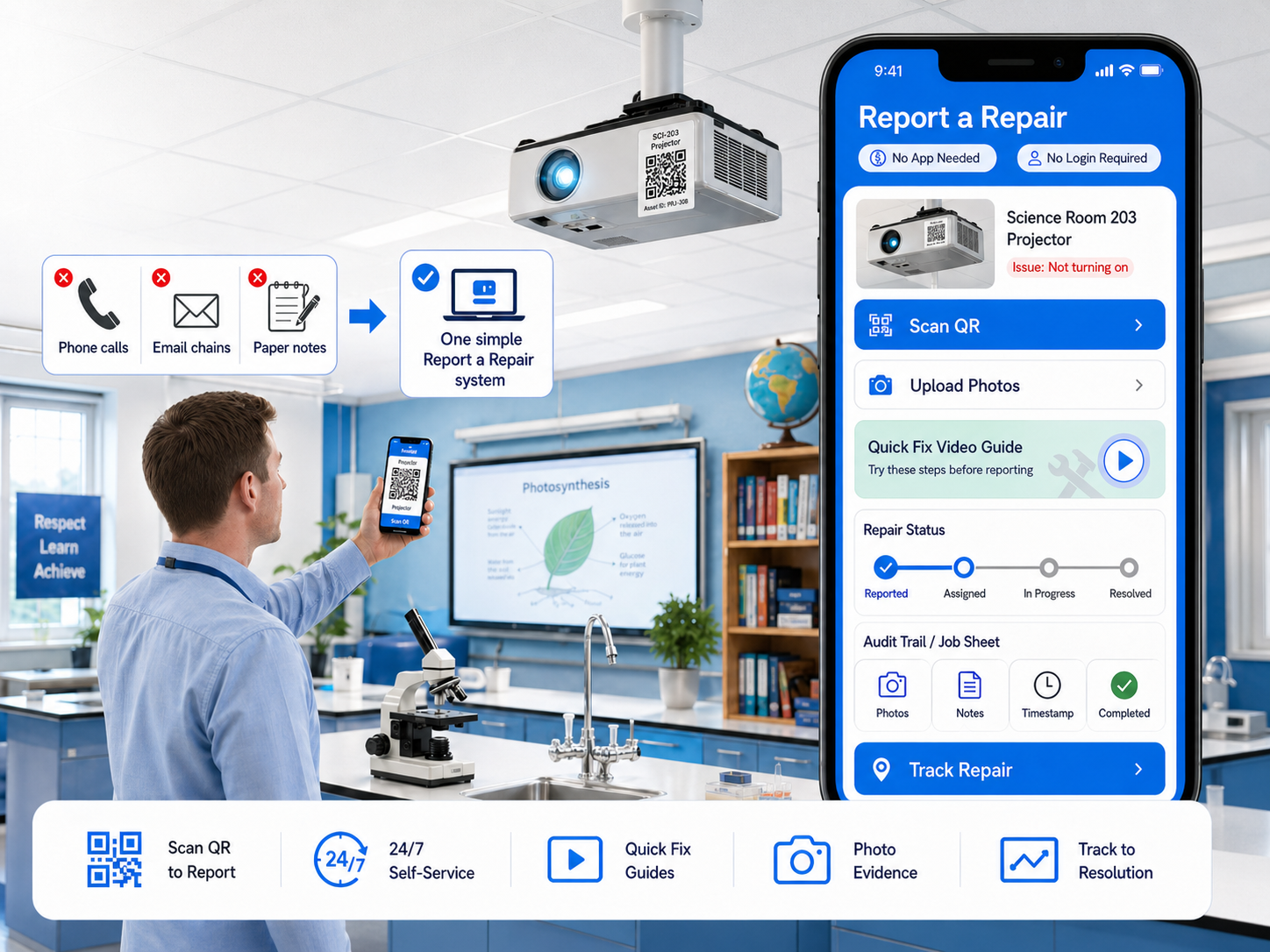
Report a Repair self-service repair reporting software for schools showing 24/7 QR code reporting dashboard and mobile interface

The Simplest Way to Report and Track Repairs in Education Buildings

Report a Repair is built for how UK education facilities teams actually work. Used by caretakers, site managers, premises managers, bursars, and estate directors across primary schools, secondary schools, academies, multi-academy trusts, colleges, and universities. Anyone can report a building fault in under 60 seconds by scanning a QR code, no login, no app, no training. Every report includes photo evidence, prioritisation based on severity, and a complete audit trail from day one.
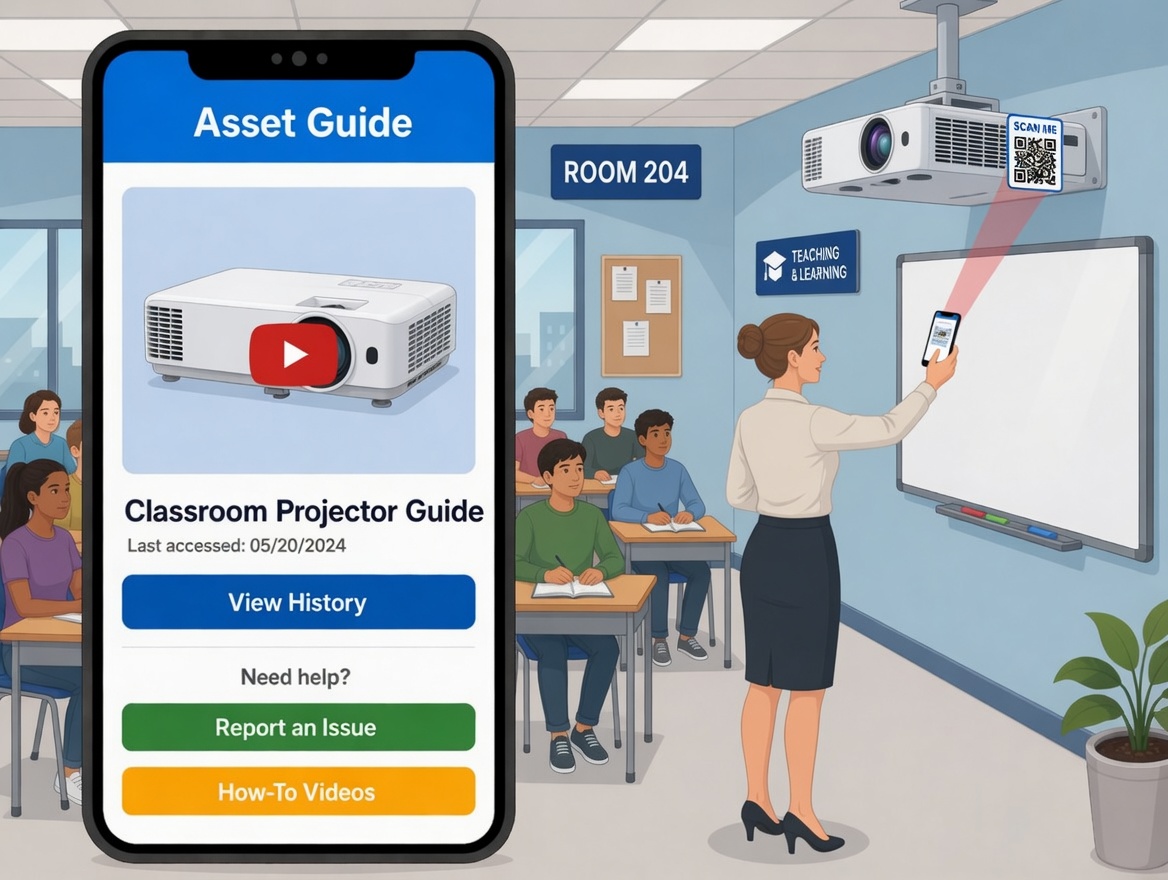
24/7 self-service report a repair for schools showing QR code scanning and structured repair form on smartphone

24/7 Self-Service Report a Repair for Schools

  • Enable staff, students, and visitors to report repairs from any location by scanning a QR code on a classroom door, corridor, or piece of equipment, or through your school website or app
  • Gather comprehensive repair details through a structured form that captures the issue type, location, description, and urgency, giving your facilities team everything they need to respond
  • Enhance transparency and accountability with photo evidence for repair completion, creating a visual record from report to resolution

The result: No more phone calls, paper slips, or emails lost in inboxes. Staff and students report faults in under 60 seconds, no login or account needed. Your facilities team gets a complete, structured repair report with photo evidence instantly.

START YOUR FREE TRIAL
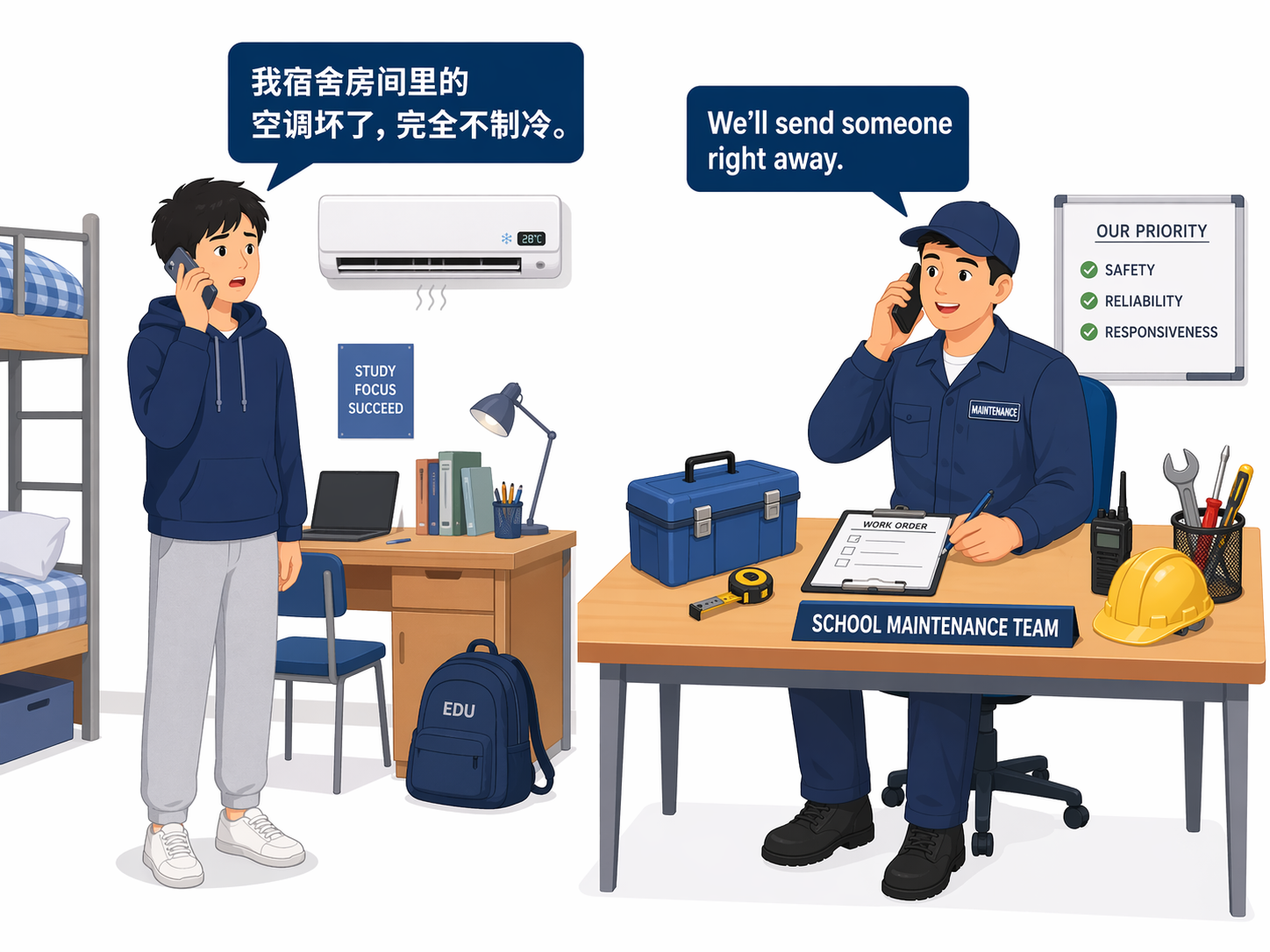
Multilingual repair reporting form for schools and universities showing language selection for diverse school communities

Multilingual Support for School Communities

  • Report a Repair offers an option to report in multiple languages, helping with inclusivity and accessibility across diverse school communities, including EAL families and international students
  • Allow staff, students, and parents to translate repair forms into their preferred language, reducing communication barriers that prevent faults from being reported
  • Enhance the reporting experience by accommodating language preferences, ensuring your facilities team receives clear, actionable repair descriptions every time

The result: Schools and universities with diverse communities see more faults reported by staff and students who previously avoided calling or emailing because of language barriers. More faults reported early means fewer issues escalating into expensive emergency repairs.

See Multilingual Reporting in Action
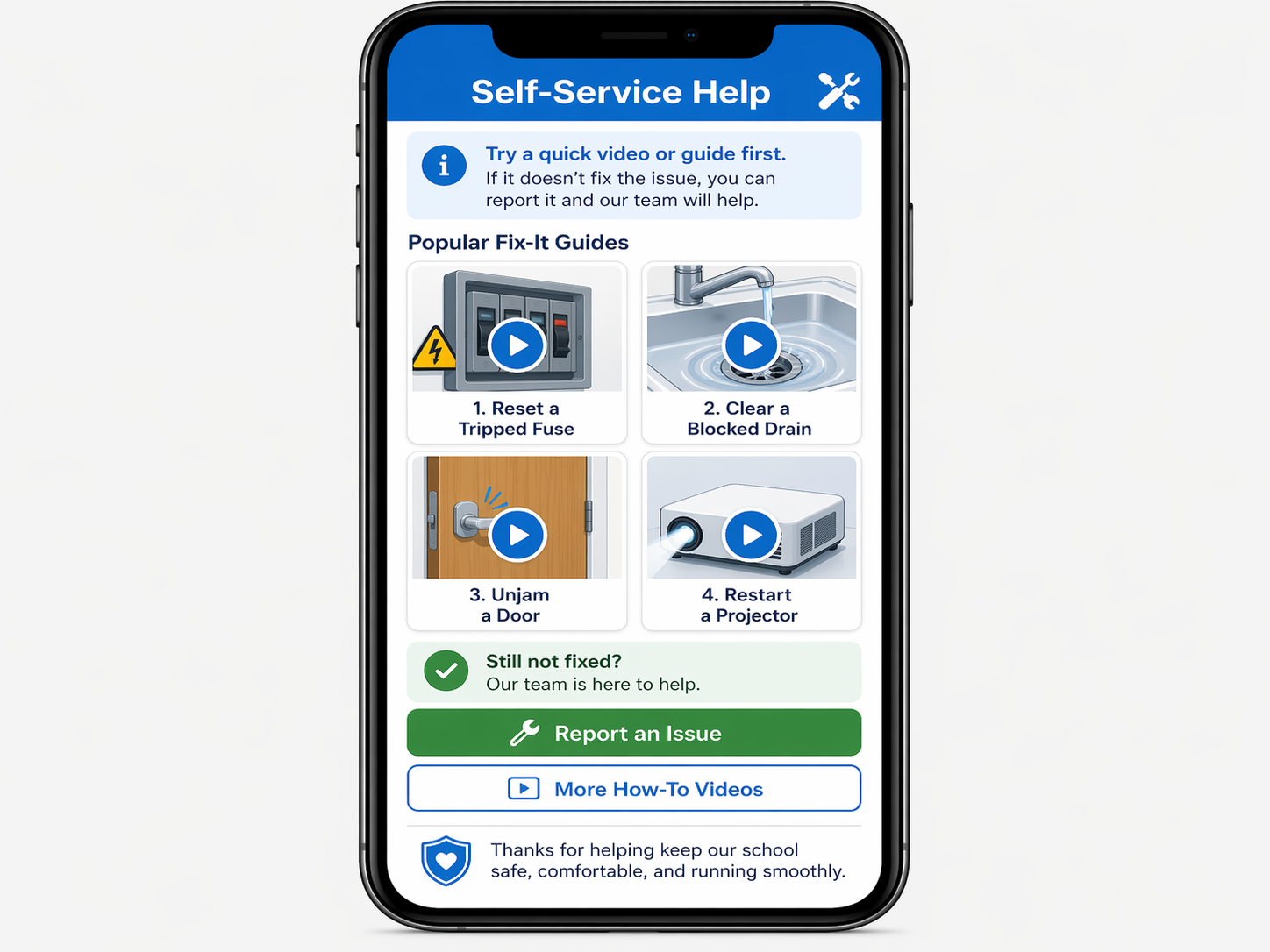
Self-service video guides for school staff showing how to resolve minor maintenance issues independently before submitting a repair

Self-Service Videos and Guides for Staff

  • Give staff and students resources to resolve minor issues independently, like resetting a tripped fuse, unjamming a door, clearing a blocked drain, or restarting a projector
  • Reduce facilities team workload by minimising unnecessary repair calls and emails for issues that can be fixed in minutes with the right guidance
  • Enhance satisfaction by quickly dispatching a contractor when the self-service option does not resolve the issue, so genuine repairs are addressed faster

The result: Teachers and staff resolve simple fixes themselves before submitting a report. Your caretaker and facilities team spend less time on unnecessary calls and more time on genuine maintenance work that keeps the school running.

Try Self-Service Support Now
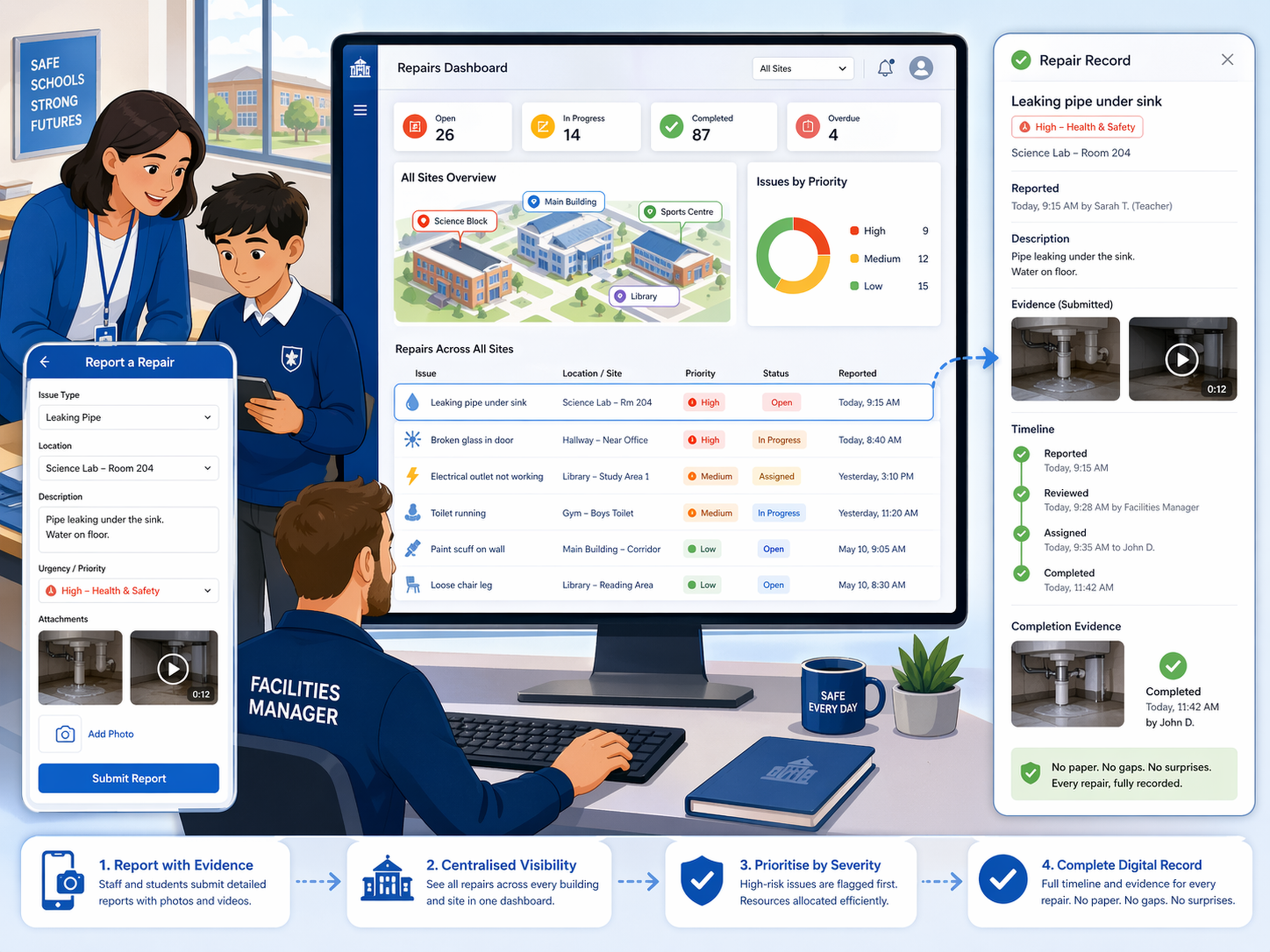
Accurate repair reporting with photo and video evidence for school facilities management showing severity-based prioritisation

Accurate Reporting for Efficient Resolutions

  • Allow staff and students to provide detailed repair information through uploading photos and videos, giving your facilities team visual evidence to assess issues remotely before dispatching anyone
  • Assist facilities managers in managing large school estates, multi-building campuses, and multi-academy trusts with a centralised dashboard showing every repair across every site
  • Optimise repair prioritisation and resource allocation based on issue severity, so health and safety hazards are addressed first and cosmetic issues are queued appropriately

The result: When a governor, inspector, or headteacher asks "what happened with that repair?", your facilities manager shows the complete report with photos, priority level, timeline, and completion evidence in seconds. No paper. No gaps. No surprises.

See How It Works
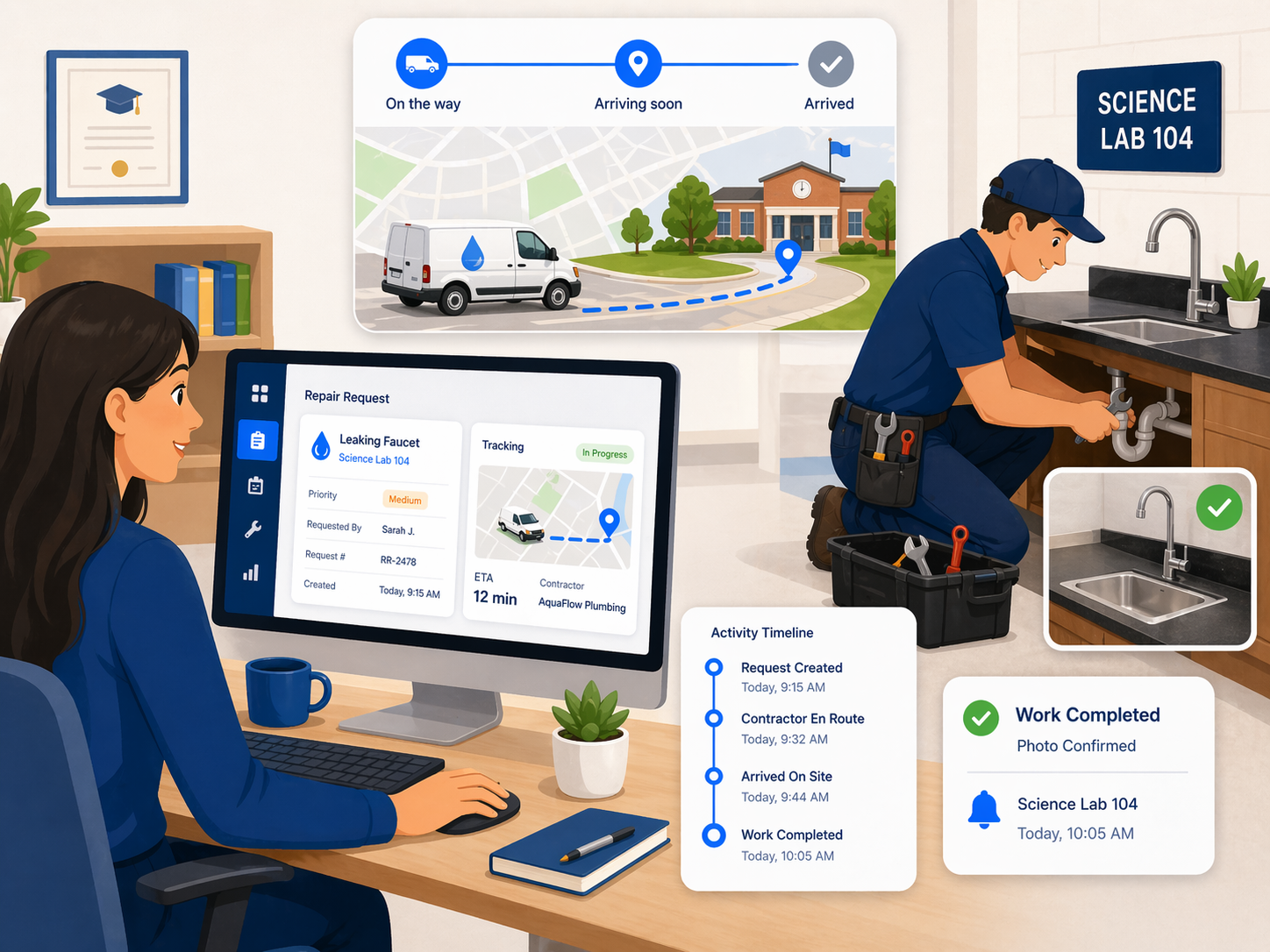
Real-time contractor ETA and location tracking for school building repairs preventing missed visits

No More Missed Contractor Visits

  • Keep staff and facilities teams informed with real-time updates on contractor ETA and location, so your school always knows when the plumber, electrician, or glazier will arrive
  • Prevent missed visits, saving both time and resources for your facilities team and contractors, and avoiding disruption to the school day
  • Contractors confirm completion with photo evidence, creating a permanent record linked to the original repair report for compliance and audit purposes

The result: School office staff stop wasting hours every week chasing contractors for ETAs. Report a Repair keeps everyone informed automatically. Your team focuses on running the school, not chasing the plumber.

SCHEDULE A DEMO

One System for Your Entire School Community

Teachers, students, caretakers, and estate directors, all connected through one repair reporting system from any device. Works from any smartphone, tablet, or desktop. No app download, no accounts, no training. Anyone can report a building fault in under 60 seconds.

24/7 QR code reporting. No login needed. Complete accountability.
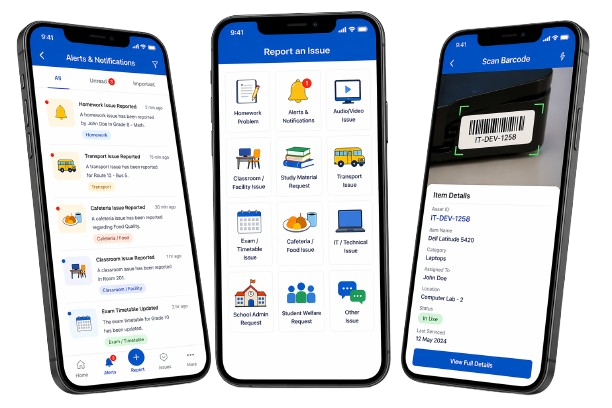
Report a Repair mobile platform for school facilities management showing QR code self-service repair reporting, photo upload, and contractor tracking on smartphone

See How Schools Report and Track Repairs with Report a Repair

Watch a 2-minute walkthrough of how teachers, caretakers, site managers, and estate directors across schools, academies, colleges, and universities use Report a Repair every day, from a student scanning a QR code on a classroom door to report a broken radiator, to the facilities team tracking the contractor's arrival in real time and receiving photo evidence of the completed repair.

Everything Your School Needs for Repair Reporting, Built In

Self-Service Video Guides

Before submitting a repair, reporters see a short video guide for common fixes like tripped fuses, blocked drains, jammed doors, and projector resets. This helps reduce unnecessary repair calls, saving your facilities team hours every week. Staff resolve simple issues themselves in minutes instead of waiting days for a contractor.

No Login Required, Zero Friction

Anyone can report a repair without creating an account, downloading an app, or signing in. Teachers between lessons, students in corridors, cleaners on shift, visitors during events, everyone reports faults in under 60 seconds with just a smartphone camera. This removes the biggest barrier to adoption that plagues traditional CMMS systems.

OFSTED-Ready Audit Trails

Every repair report is timestamped with reporter details, location, photos, contractor assignment, and completion evidence. This creates a complete audit trail for OFSTED inspections, DfE estate condition reporting, health and safety documentation, and governor meetings. Export PDF reports instantly when an inspector arrives. No last-minute scrambling.

Multilingual Reporting

Repair forms are available in multiple languages so teachers, students, parents, cleaning staff, and international students can describe faults accurately in their preferred language. This removes language barriers that prevent issues from being reported, reduces miscommunication, and ensures your facilities team receives clear, actionable reports every time.

Multi-Academy Trust Ready

Manage repair reporting across all schools in your MAT from one central dashboard. Estate directors get full cross-trust visibility of repair volumes, response times, recurring faults, and compliance status. Each site retains operational independence while trust-level reporting rolls up into a single view. Compare performance across schools at a glance.

White-Label & Integration

Embed Report a Repair into your existing school website, intranet, or parent portal. White-label the interface with your school colours, logo, and branding so it feels native to your platform. Integrates with existing CMMS, CAFM, and facilities management systems. No disruption to your current setup.

Modernise your school's repair reporting today.

Starting from £20/month

Book a call with an expert

Frequently Asked Questions

Schools stop losing repair requests by giving everyone one simple way to report issues and one place to track them. With Report a Repair, a fault can be submitted through a web form, QR code, or school app, then logged instantly with the issue details, location, and photo evidence. That means the facilities team no longer has to chase scattered emails, missed voicemail messages, or handwritten notes.
The easiest way is to let teachers report a problem from their phone in a few steps. A teacher can open the repair form from a QR code, website link, or app, add a short description, upload a photo, and submit it there and then. That is far easier than emailing the office, filling in paper forms, or trying to find the caretaker during the school day.
The best way is to use a no-friction reporting form that students can access instantly. Report a Repair is designed so a fault can be reported by scanning a QR code or opening a direct link, without needing a full maintenance-system login or specialist training. That makes it much more likely that broken radiators, damaged doors, leaks, and lighting issues get reported early instead of being ignored.
The best way is to make reporting available right where the problem happens. If a classroom door, radiator, window, projector, or light has a fault, staff can open the form from a QR code or link, add the issue details, upload photos, and submit it on the spot. Because the report is mobile responsive and structured, the maintenance team gets clear information straight away instead of vague messages that need chasing.
Schools need a system that captures the problem in a structured way and shows priority clearly. Report a Repair lets the office or facilities team see the issue, review photos, understand the area affected, and assign or review the priority before it moves forward. That helps schools separate urgent health-and-safety work, like electrical faults or serious leaks, from lower-priority issues such as minor cosmetic repairs.
The best approach is to collect the report with enough detail for the site team to act fast. Report a Repair allows the reporter to submit the fault with photos, notes, location details, and extra context, so serious issues are easier to identify and escalate quickly. In practice, that helps schools respond faster to problems that could affect safety, teaching, or access to rooms and facilities.
Schools need a repair system that records the whole journey, not just the first message. In Report a Repair, each issue starts as a work request, then the office or facilities team can review it, add target dates, and convert it into a work order for internal staff or contractors. This gives schools a clearer path from first report to assigned job and completed repair.
The best way is to make sure each repair creates a digital record from day one. Report a Repair stores the issue details, who reported it, any photos attached, priority, location, and what happened next, all in one system. That gives schools and colleges a much stronger audit trail than relying on email threads or paper notes that are easy to lose.
Schools keep records inspection-ready by using a system where repair reports are already organised, searchable, and linked to evidence. Report a Repair keeps the fault details, photos, dates, and progress together, so the school can quickly show what was reported, when it was raised, and how it was handled. That is far more useful for governors, leadership teams, and inspections than trying to piece things together afterwards.
The simplest way is to let staff and students upload images at the time of reporting. Report a Repair supports photo attachments through the reporting form, which works well on mobile devices. That means the site team can often understand the problem before attending, making triage faster and reducing wasted visits.
Colleges reduce delays by making sure urgent issues reach the right team immediately and with the right information. In Report a Repair, once the issue is submitted, a notification is sent to the admin or office team, who can see the details, photos, priority, and location in the backend. That cuts down the usual delay caused by incomplete messages, repeated calls, or unclear handovers.
They need a backend view that shows more than just a basic note. Report a Repair lets site managers see the work request, who submitted it, the issue summary, the location, attached images, priority, and additional details. From there, they can decide what should happen next, including adding a target completion date or moving it into a work order.
Schools stop missing visits by moving away from verbal updates and disconnected emails. Report a Repair includes contractor tracking and status visibility, so the school knows when work is progressing and can keep a clearer record of attendance and completion. That reduces the time office staff waste chasing contractors and helps the school stay better informed.
A strong system for MATs is one that combines easy local reporting with central visibility. Report a Repair is built so individual sites can log and manage their own issues while trust-level teams can still see repair activity across multiple schools from one dashboard. That makes it easier to compare response times, recurring problems, and repair volumes across the trust.
The best way is to have one reporting process across every site. With Report a Repair, each school can submit faults in the same way, while the central estates team can review requests, priorities, and statuses in one place instead of working across separate inboxes and spreadsheets. This is especially useful for trusts or college groups that need consistency without making reporting harder for staff.
Universities need a system that works across multiple buildings and gives estates teams a central view. Report a Repair supports multi-site use, so issues can be reported from different campus locations and reviewed from one dashboard with location, severity, and supporting evidence. That helps estates teams handle urgent faults faster and keep better oversight across large estates.
The easiest option is to give students a reporting route that works 24/7 from their phone. Report a Repair can sit behind a direct link, website page, QR code, or app, so students in halls can report a heating issue, leak, lock problem, or damaged fixture as soon as it happens. This is much better than waiting for office hours or relying on a phone call that may not capture the full problem.
The best way is to use a structured reporting form that captures the right details first time. In Report a Repair, the student or resident can add notes, upload images, enter the room or address details, and include extra information such as access permission or whether a vulnerable occupant is involved. That gives the accommodation or estates team a clearer and more useful repair report from the start.
Schools can reduce wasted call-outs by giving staff some self-service help before they submit a repair. Report a Repair includes short guides and videos for common minor issues, which can help someone solve a simple problem without needing a contractor or caretaker visit. That means the maintenance team spends more time on genuine faults and less time on issues that could have been fixed in minutes.
Yes, and that matters more than many schools realise. Report a Repair supports multilingual reporting, which helps staff, students, families, and wider school communities explain faults more clearly and with less confusion. For colleges and universities with diverse or international communities, that can make reporting easier and help issues get raised earlier.

Got more questions?

VISIT OUR FAQ PAGE

Ready to modernise repair reporting at your school?

START FREE 14-DAY TRIAL