
Stop Running Out of Supplies Across Sites
Track what's used, what's left, and what needs ordering, from a phone.
Invntry is inventory management software built for commercial cleaning companies and facilities management teams who juggle stock across multiple client sites, depots, and vans. See what's in each site store cupboard without calling anyone. Teams scan items in/out, request stock from their phone, and you get low-stock alerts before things hit zero.

Built for Cleaning & Facilities Management Teams
Essential features that help commercial cleaning companies, in-house facilities teams, and janitorial contractors prevent stockouts, reduce waste, and control costs across multiple sites, all from one mobile-first platform. Perfect for site supervisors and mobile teams.

Get a Ping Before You Run Out, Buy in Time, Not in Panic
- Set minimum stock levels for every janitorial supply, chemicals, PPE, paper goods, dispensers, consumables
- Instant SMS and email alerts sent to site supervisors, operations managers, or whoever needs to know
- Buy in time, not in panic, giving you time to reorder from your preferred suppliers before you hit zero
- Customizable alert thresholds based on usage patterns and supplier lead times
- No more emergency orders, last-minute courier fees, or scrambling for supplies during a job
Why this matters: Running out of cleaning supplies means disrupted service, emergency buying at higher prices, and unhappy clients. Low-stock alerts give you time to order before you hit zero.
BOOK A DEMO
Scan It In, Scan It Out, No Spreadsheets
- Site supervisors and cleaning teams scan barcodes with their phone camera to check supplies in/out, no desktop required
- Update stock in seconds: Open app → Scan item → Done
- No spreadsheets, no paper forms, no calling the office, just point, scan, and go
- Works offline and syncs when connected, perfect for basement storage rooms or client sites with poor signal
- Update stock while doing site visits, in depot receiving areas, or loading vans for jobs
Why this matters: Site teams don't have time for admin. Fast scanning means accurate stock counts without the paperwork. Perfect for site supervisors and mobile teams.
See Stock Requests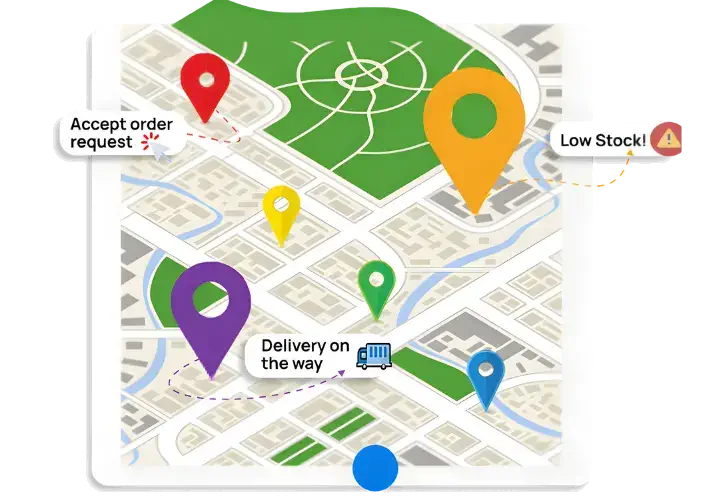
See What's in Each Site Store Cupboard (and What's Missing), Without Calling Anyone
- Real-time dashboard shows exactly what's in each site cupboard, depot, or van, and what's running low
- No more calling site supervisors to check, access inventory from any device
- No more spreadsheets or phone calls, everyone sees the same up-to-date numbers
- Multi-location support, manage 5 client sites or 50 buildings from one dashboard
- Redistribute cleaning supplies between sites instantly based on actual needs
Why this matters: Cleaning happens across multiple sites 24/7. Real-time visibility means you know what's in each site store cupboard without calling anyone, and can redistribute stock immediately.
Try Inventory Free
See What Each Site Actually Uses, Spot Waste, Over-Ordering, and Slow Suppliers
- Invntry auto-generates reports showing consumption patterns by site, team, or client contract
- See which cleaning supplies each site actually uses (and which slow-moving items you're overstocking)
- Supplier performance tracking, late deliveries, wrong quantities, quality problems
- Export reports to Excel for client billing, budget tracking, or finance teams
- Predictive analytics based on historic usage to order the right amount at the right time
Why this matters: Cleaning companies waste money ordering the wrong quantities or overstocking slow-moving items. Reports show you what each site actually uses so you can cut waste and over-ordering.
See Multi-Site Cleaning Inventory
No More "It Never Arrived", Photos + Signatures, Saved Against the Delivery
- When cleaning supplies arrive, teams use the mobile app to capture delivery photos and digital signatures from drivers
- Essential for bulk chemical deliveries, equipment, and high-value cleaning supplies
- Complete proof of delivery documentation, know exactly who received what, when, and from which supplier
- Automatically match deliveries against purchase orders to catch missing items or wrong quantities immediately
- Reduce disputes with suppliers and prevent missing boxes, errors, or "short deliveries"
Why this matters: Cleaning suppliers sometimes deliver incorrect quantities or missing boxes. Photo proof protects you from disputes and chargebacks, no more "it never arrived".
Start Stock TrackingStock Control on Mobile, Perfect for Site Supervisors and Mobile Teams
Site teams request stock from their phone when they're running low. Teams record incoming deliveries and match them with purchase orders using a mobile device. Operations managers see real-time stock and inventory levels across all sites from one dashboard.
Scan it in. Scan it out. No spreadsheets.

See Invntry in Action: Smart Inventory Management for Cleaning & Janitorial Services
Everything You Need to Manage School Inventory Efficiently

Predictive Stock & Inventory
Based on historic usage of stock and inventory within the business, you can manage future inventory and stock needs within the business. Preventing out of stock situations and letting your business continue to function seamlessly.

Stock & Supplies Insights
With our inventory and stock control app, you can quickly access information on the stock levels at hand and essential details. Moreover, stock lead times with suppliers and use-by/expiry dates help you not only order in time but also use them efficiently.

Suppliers Deliveries Tracking
Cross-check deliveries against what was ordered in real time. Empower your staff to verify quantities instantly and ensure accuracy. Capture delivery photos, driver and recipient signatures as proof directly within the app.

Integration ready
Our Inventory & Stock Control app integrates seamlessly with your enterprise resource planning and customer relationship management systems, including industry leaders such as SAP, Microsoft Dynamics, IBM Maximo, Oracle, and Salesforce.

Custom Notifications
Stay informed and in control with our Custom Notifications feature. Set personalised alerts tailored to your business needs, ensuring timely action on stock requests and low-stock items.

Take control of your inventory today
Starting From £37/month
Book a call with an expert
Frequently asked questions
- item
- quantity
- cleaner name
- reason
- signature
- stock by site
- low stock items
- item movement history
- usage by contract
- supplier deliveries
- stock issued by staff