
MaintainPad Asset Management - Software for Schools, Academies & Universities
Spreadsheets lose assets. Email chains miss repairs. Paper registers fail OFSTED. Schools, academies, MATs and universities replaced all three with MaintainPad in under two weeks.
One mobile-first platform for QR & RFID asset tagging, check-in/check-out, the Report-a-Repair portal, planned preventive maintenance, OFSTED compliance checklists and DfE-aligned depreciation, all modules included.
Complete Asset Management, One Platform, One Price
Built for schools, MATs and universities. Every module included from day one, no per-user charges, no hidden fees, total asset control.

QR & RFID Asset Tagging
- Print waterproof QR and RFID labels with the included Bluetooth printer, no extra hardware costs
- Any staff member scans from a smartphone to see the full asset record: location, condition, warranty, PPM date and repair history
- Unlimited tags included in every plan, zero per-asset charges
The result: Every asset visible, every scan instant, complete oversight.
START FREE TRIAL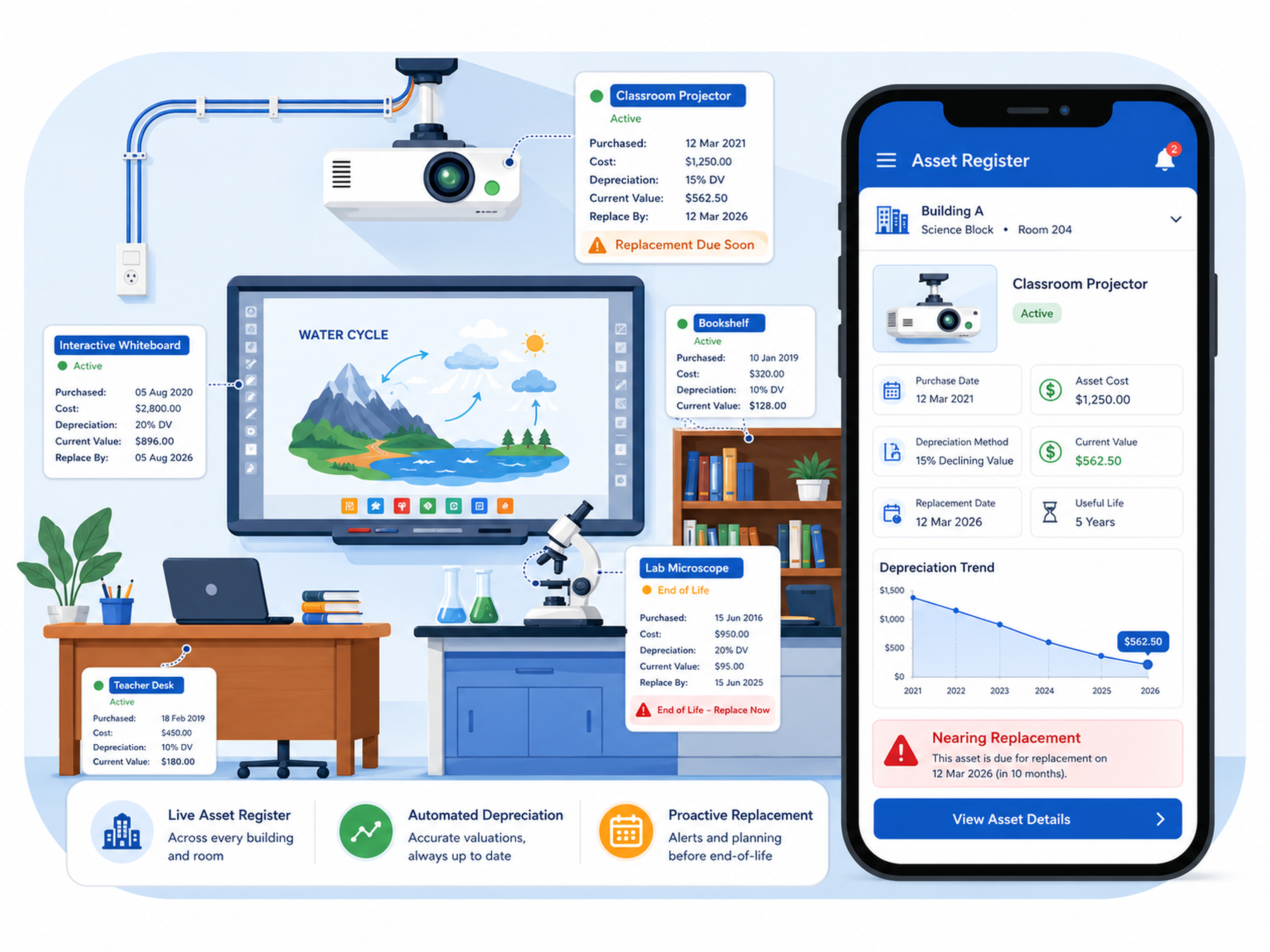
Fixed Asset Management
- Live digital asset register across every building, purchase date, cost, depreciation and replacement date in one place
- Automated depreciation (straight-line or reducing balance) keeps DfE returns accurate without spreadsheets
- Proactive end-of-life alerts so capital spending is planned, not reactive
The result: Accurate financials, confident DfE submissions, no spreadsheets.
SEE How It Works
Rotating Asset Check-In/Check-Out
- Scan to check out any asset, laptops, tablets, projectors, instruments, to a named user or room
- Automated overdue alerts chase returns so nothing goes missing
- Damage recorded with photos on return, full accountability trail every time
The result: Every device accounted for. Every overdue return chased automatically.
Start Managing Assets Now
Report-a-Repair Portal, 24/7 Issue Tracking
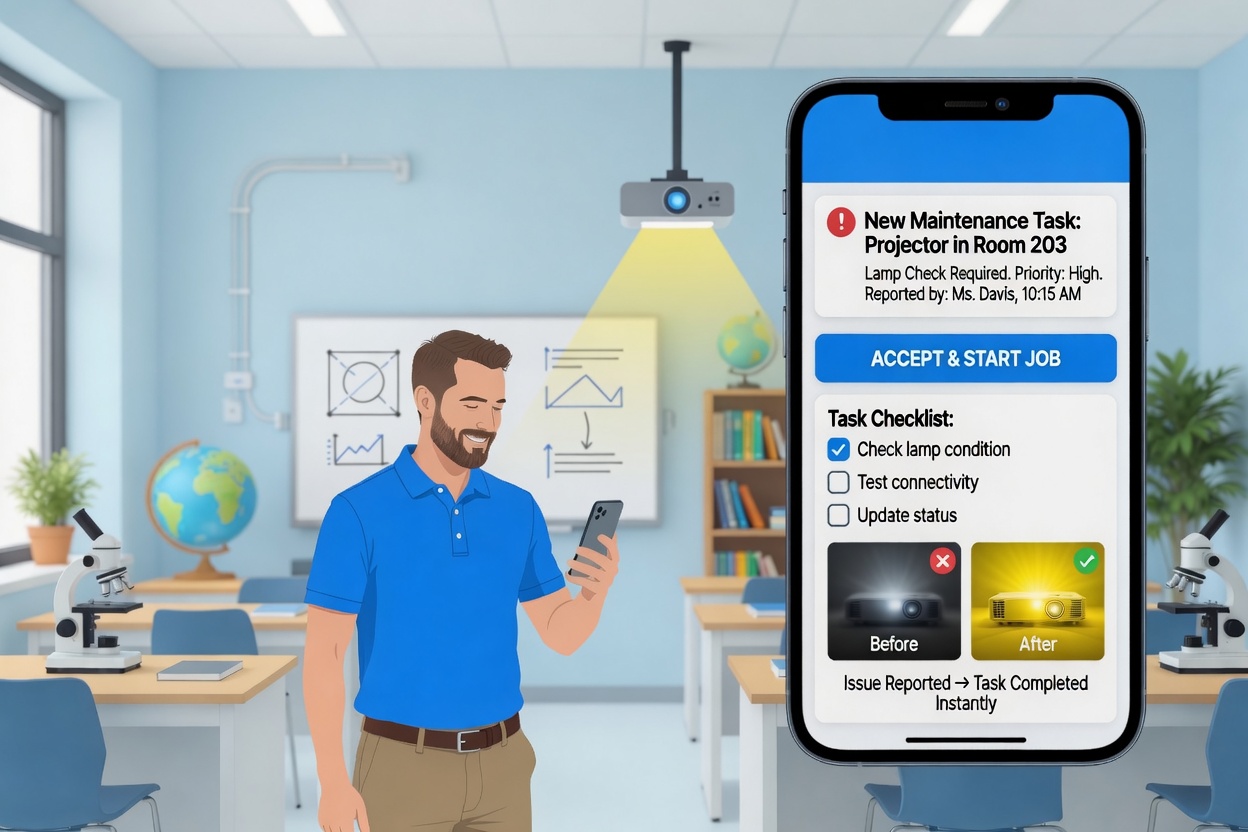
- Any staff member scans the broken asset's QR label to log a repair, no app, no login needed
- Jobs are automatically assigned, timestamped and tracked from raised to resolved
- Permanent digital job sheets with photos, costs and notes, always audit-ready
The result: No requests lost in email chains. Every repair tracked, documented and resolved.
START FREE TRIAL
OFSTED-Ready Compliance & Audit Trails
- Every inspection and check creates a timestamped, photo-verified audit trail linked to each asset
- Built-in Checkki checklists cover fire safety, legionella, COSHH and RAAC, all DfE-aligned
- Export a full compliance PDF in under 90 seconds, ready for OFSTED on arrival
The result: Generate a full inspection-ready compliance report in under 90 seconds.
SCHEDULE A DEMOYour Asset Register, On Every Device
iOS and Android. Fully offline-capable. Scan assets, check in/out, raise repairs and complete compliance checklists anywhere on site, data syncs the moment signal returns. No gaps, ever.
Your assets don't sit still. Your system shouldn't either.

See How Education
Estates Run Smarter
with MaintainPad
Watch a 2-minute walkthrough of how site managers, bursars, facilities teams and estate directors across schools, academies, colleges and universities use MaintainPad every day, from logging a broken radiator on a mobile to passing inspections without a paper trail in sight.
Additional Capabilities
Asset Depreciation & Financial Reporting
Automated depreciation (straight-line or reducing balance) keeps your asset register accurate for DfE returns and governors' reports, no spreadsheets needed.
Asset Analytics & Custom Reporting
Condition scores, repair histories, utilisation rates and compliance records across every site. Export to PDF or share live, built for governors, bursars and IT managers.
Multi-Academy Trust Dashboard
One central dashboard for every school in your trust. Full cross-trust visibility of asset health, repair queues and compliance, each site independent, trust reporting live.
School MIS & Finance Integration
Two-way sync with SIMS, Arbor, Bromcom, ScholarPack, IRIS, Sage and Xero via API. Keep your asset register, finance ledger and school information system aligned, automatically.
Mobile Asset App with Offline Mode
iOS and Android, fully offline. Scan, check in/out and raise repairs anywhere, even in basements, rural campuses or areas with no Wi-Fi. Syncs automatically when back online.
Dedicated UK Education Support
UK-based support by phone, email and live chat. Deep knowledge of OFSTED, DfE guidance and school financial reporting. Fast response, no offshore call centres.
Modernise your maintenance management today.
Starting from £85/month
Book a call with an expert
Frequently Asked Questions
This helps schools because staff no longer need to rely on old spreadsheets that go out of date. Every asset sits in one place, and the record can be updated from both the mobile app and the web-based admin system. That makes it much easier to keep track of classroom equipment, IT devices, site assets, and maintenance history.
For schools and colleges, this means every device can be logged properly and checked quickly. Staff can scan or search the record, see where the device belongs, and view its warranty, service dates, and previous repair work. This is much more reliable than trying to manage student devices and staff laptops in spreadsheets or paper lists.
This creates accountability. Instead of asking around when something goes missing, the team can check the asset record, see its last known details, and review the repair or work order history linked to that item. That is especially useful for shared IT devices, portable equipment, tools, AV items, and teaching resources that move around often.
That means if a laptop, projector, tablet trolley, or other piece of equipment is assigned to a person or area, the school has a clear place to record that. This gives office teams, site teams, and IT teams a simple way to check responsibility instead of chasing emails or asking several departments. It also makes handovers, returns, and internal audits much easier.
For education teams, that makes the system a good fit for check-in and check-out processes. You can label the item, record who is using it, note its location, and keep a running history against the asset. This is much better than relying on memory or paper sign-out sheets, especially when the same equipment is used by different staff, students, or departments.
This is useful for universities because assets are rarely kept in one place. Equipment may sit in teaching rooms, labs, workshops, offices, libraries, or maintenance areas. By linking each asset to a location and keeping all records in one central system, teams get a clearer view of what they have, where it is, and what work has been done to it.
For a trust or multi-school group, that kind of central view is valuable because head office teams can see upcoming issues and asset activity without asking each school to send separate reports. It also helps local school teams keep their own records updated while still giving central leadership a better overview of assets, due dates, repairs, and risks across sites.
This is useful because schools do not need to rely on long email chains, verbal handovers, or paper forms that get lost. When a problem is reported against the asset itself, the maintenance or support team can see the issue in context, assign the job, and keep the record updated. That gives schools a clearer process for reporting faults and a better history of what has happened to each item.
This matters because schools often need to know more than just whether an item exists. They need to know what went wrong, when it was repaired, who worked on it, and whether the same issue keeps happening. A proper repair history helps schools make better decisions about whether to repair, replace, reassign, or retire equipment.
This helps education teams move away from reactive maintenance. Instead of waiting for equipment to fail, they can plan servicing ahead of time, check what is due soon, and run reports for assets by service date or category. This is useful for IT equipment, generators, boilers, pumps, facilities assets, and other important equipment across the site.
The transcript does not mention OFSTED by name, but the type of records it describes are exactly the kind of information schools often need during internal checks, finance reviews, and operational audits. A central asset record makes it much easier to show what equipment the school owns, where it is, what condition it is in, and what work has been done to it.
This gives education teams a much stronger record than a simple item list. Instead of only knowing that an asset exists, they can also see where it is, what it is worth, when it needs attention, and what has happened to it over time.
The transcript strongly supports this fuller approach. It describes not just a list of assets, but a system that stores maintenance, due dates, insurance, depreciation, and work order history. That makes it much more useful for schools, colleges, and universities that need proper control of valuable equipment.
This is useful for education teams because it helps them understand asset value over time and plan future replacement more sensibly. For example, a school can keep track of ageing laptops, classroom equipment, furniture, or site assets and use that information when budgeting for replacements instead of waiting until items fail without warning.
Each item can have its own asset record, barcode, images, location, and staff link. That means schools can see what the item is, where it should be, and who it is connected to. This makes loan equipment much easier to manage than using paper sign-out sheets or separate spreadsheets for each department.
For education teams, that means a laptop, projector, generator, tool, or classroom device can be labelled and identified quickly. Once scanned or matched, staff can see the asset record, check details, update location, review warranty or service information, and view repair history. This helps reduce confusion and saves time when managing a large number of assets.
That makes QR or barcode tracking a practical option for education settings where teams want a clear, affordable way to identify and manage assets. RFID can be useful in some environments, but the transcript does not mention RFID support. So based on the video, the strongest answer is that QR and barcode tracking are the proven approaches shown for this system.
This is especially useful for high-value lab, AV, and specialist teaching assets because those items often need more than a simple inventory count. Universities need to know where they are, what work has been carried out, what they are worth, whether they are still under warranty, and when they need servicing. A proper asset record gives them that visibility.
A safe way to answer this FAQ is to say that schools and colleges should ask the vendor which direct integrations are available for their own setup. Even without a named integration in the transcript, having a central asset register plus exportable data is still a big improvement over disconnected spreadsheets and paper records.
In practice, the move usually becomes easier when schools start with their most important assets first, such as laptops, tablets, site equipment, high-value devices, and shared resources. Once those are in the system, the team can build out the register over time instead of trying to digitise everything in one go.