
Smart Work Order Software for Schools, Colleges, Academies & Universities

Stop chasing repairs by phone, email, and WhatsApp. Smart Workorders gives education facilities teams one platform for 24/7 repair reporting, automatic contractor management, and OFSTED-ready compliance.

Staff and students report repairs by scanning a QR code. Self-service video guides reduce unnecessary call-outs by up to 40%. Contractors are sourced, tracked, and rated automatically. Every job has a complete photo-verified audit trail.

Smart Workorders work order management software for schools showing 24/7 repair reporting dashboard and QR code scanning interface

The Smarter Way to Manage School Maintenance Work Orders

Smart Workorders is built for how UK education facilities teams actually work. Used by caretakers, site managers, premises managers, bursars, and estate directors across primary schools, secondary schools, academies, multi-academy trusts, colleges, and universities. From QR-code repair reporting to contractor sign-off, everything is included from day one.
School staff and students reporting repairs via QR code scan on smartphone using Smart Workorders 24/7 repair reporting system

24/7 Repair Reporting via QR Code, No Phone Calls, No Missed Repairs

  • Students, teachers, and staff report repairs instantly by scanning a QR code with any smartphone camera, or via a web portal on your school website, 24 hours a day, 7 days a week
  • Reporters upload a photo of the issue, giving your facilities team visual evidence to assess severity remotely before dispatching anyone
  • Every repair request is automatically logged, timestamped, sorted by issue type and priority, and compiled into your dashboard for complete visibility
  • Self-service video guides appear before the report is submitted, letting reporters try a quick fix for common issues like a tripped fuse or blocked drain, reducing unnecessary work orders by up to 40%
  • No phone calls, no paper slips, no emails lost in inboxes, every repair is captured, categorised, and tracked from report to resolution

The result: Schools report up to 80% less time chasing repairs. The self-service video guides alone save facilities teams hours every week by preventing unnecessary call-outs for simple fixes that staff can resolve themselves.

Try 24/7 Repair Reporting Now
Automatic contractor sourcing and job allocation for school maintenance with real-time tracking and ETA notifications

Automatic Contractor Sourcing for School Repairs, No More Chasing Quotes

  • When a repair needs a contractor, Smart Workorders can tender the job to your existing contractors or automatically allocate it to internal maintenance staff based on skill, availability, and proximity
  • Contractors receive job assignments with real-time notifications including full job details, photos, and location, with no need to visit an office for job sheets
  • Track contractor ETAs and live location in real time so you always know when they will arrive, reducing missed appointments that cost schools between £75 and £150 each
  • Get instant quotes from multiple contractors and approve with one click, ensuring best value for every repair across your school estate
  • Contractor performance is tracked with ratings and feedback via the integrated Be Heard module, building a reliable, accountable contractor network over time

The result: Schools typically spend 6+ hours per week coordinating contractors by phone and email. Smart Workorders automates the entire process, from sourcing to quote comparison to sign-off, saving your facilities team an entire working day every week.

SEE HOW IT WORKS
Digital job sheets with before-and-after photo evidence, completion checklists, and staff sign-off for school repair work orders

Digital Job Sheets with Photo Evidence, Complete Accountability for Every School Repair

  • Engineers and contractors complete work using digital job sheets on their mobile device, capturing work schedules, completion notes, parts used, and time spent
  • Before-and-after photo and video evidence is captured for every job, creating an unbreakable visual audit trail for OFSTED compliance and dispute resolution
  • Students or staff sign off on completed work directly on the engineer's device, confirming the repair was done to satisfaction
  • Job-specific completion checklists via the integrated Checkki App ensure nothing is missed, whether it is a boiler service, fire door check, or classroom repair
  • All documentation is stored permanently and linked to the asset, building, and work order for instant retrieval during OFSTED inspections, governor meetings, or compliance audits

The result: When a governor, inspector, or headteacher asks "what happened with that repair?", your facilities manager opens Smart Workorders and shows the complete job history with photos, sign-off, and timeline in under 30 seconds. No paper. No gaps. No surprises.

START YOUR FREE TRIAL
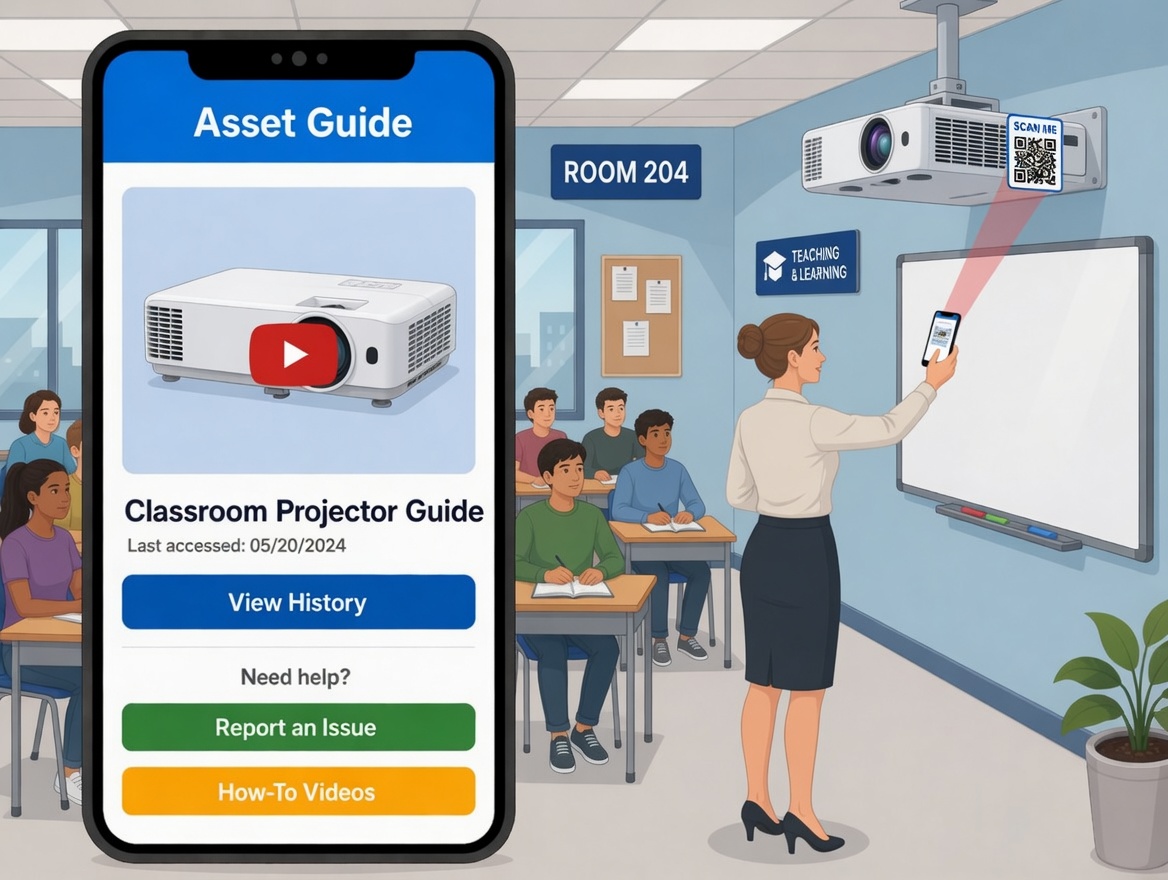
QR code asset tagging and tracking for school equipment showing purchase info, warranty, repair history, and maintenance schedule

QR Code Asset Tagging for Your School Estate, Full History at a Smartphone Scan

  • Tag every asset across your school estate, projectors, lab equipment, fire extinguishers, boilers, kitchen equipment, playground fixtures, and minibuses, with a unique QR code label
  • Scan with any smartphone to instantly access purchase information, warranty details, repair history, part replacement records, technical manuals, and video guides
  • Know exactly where every asset is, when it was last serviced, who serviced it, its current condition, and when it needs attention next
  • Engineers access technical guides and video manuals for each asset directly via the QR code, enabling faster problem resolution and higher first-time fix rates
  • QR codes can be printed on any standard printer, no special hardware or labels required

The result: A typical secondary school manages 3,000 to 5,000 trackable assets. Without QR tracking, warranties lapse, services are missed, and equipment disappears. Smart Workorders gives your team complete asset intelligence from a free smartphone scan, across every building on every site.

See Full Asset Control
Real-time engineer tracking with ETA notifications and route planning across multi-site school estates using the Delivity App

Real-Time Engineer Tracking and Route Planning Across Your Entire Estate

  • Track engineer and contractor locations in real time with ETA notifications, so you always know who is where and when they will arrive at each school site
  • Engineers plan efficient routes using the integrated Delivity App, reducing travel time and fuel costs across multi-building campuses and multi-site academy trusts
  • Automated progress notifications keep headteachers, bursars, and estate directors updated on every repair without a single phone call or email
  • Multi-language translation capabilities ensure all staff, including non-English-speaking cleaning and maintenance teams, can use the system effectively
  • Comprehensive graphical reports with photos and risk assessment scoring give estate directors a real-time overview of maintenance performance across every school site

The result: Multi-academy trusts managing 10, 20, or 50+ schools get real-time visibility of every repair, every contractor, and every asset across the entire estate from a single dashboard, with zero manual coordination required.

Try Real-Time Tracking Now
Contractor safeguarding for schools with DBS checks, insurance certificates, RAMS documents, ID verification, and Be Heard performance ratings stored against every contractor

Contractor Safeguarding, DBS Checks and Ratings, Every Visitor Verified Before They Arrive

  • Store DBS certificates, insurance documents, RAMS, and qualifications against every contractor in one place, with automatic expiry alerts so no certificate ever lapses unnoticed
  • Staff and students see contractor ID and profile ratings before a visit, giving visible safeguarding assurance for every repair on school grounds
  • Contractor performance is rated after every job via the integrated Be Heard feedback module, building a reliable, accountable contractor network over time
  • Tender future jobs only to contractors who meet your trust-wide compliance standards, quality thresholds, and safeguarding requirements
  • Every visit is logged with photos, time on site, digital job sheets, and sign-off, creating a complete safeguarding audit trail for governors and OFSTED

The result: Schools relying on external contractors often have no single record of who is vetted, who is insured, and who delivers quality work. Smart Workorders gives your facilities team one source of truth for contractor safeguarding and performance, defensible at any governor meeting, OFSTED inspection, or local authority audit.

SCHEDULE A DEMO

One Platform for Caretakers, Contractors, and Estate Directors

Every member of your facilities team, caretakers, site managers, premises managers, contractors, bursars, and estate directors, connected in one platform from any device, in any building, on any campus. Smart Workorders works from any smartphone, tablet, or desktop via a web browser. Unlike traditional CAFM systems that require specialist training, Smart Workorders is designed so anyone can report a repair in under 60 seconds, from a Year 7 student scanning a QR code to a university chancellor using the web portal. Your school never sleeps. Your maintenance system should not either.

24/7 repair reporting. Automatic contractor sourcing. Complete accountability.

Smart Workorders mobile platform for school facilities management showing QR code repair reporting, contractor tracking, and digital job sheets on smartphone

See How Schools Manage Maintenance Smarter with Smart Workorders

Watch a 2-minute walkthrough of how caretakers, site managers, premises managers, and estate directors across schools, academies, colleges, and universities use Smart Workorders every day, from a student scanning a QR code to report a broken radiator, to a contractor completing a digital job sheet with before-and-after photo evidence and staff sign-off.

Everything Your School Facilities Team Needs, Built In

Self-Service Video Guides

Before submitting a repair, reporters see a short video guide for common fixes like tripped fuses, blocked drains, and jammed doors. This unique feature reduces unnecessary contractor call-outs by up to 40%, saving your facilities team hours every week. No other work order system offers this.

Automatic Contractor Sourcing

Tender jobs to your existing contractors or auto-allocate to internal staff. Get instant quotes, compare costs, and approve with one click. Track contractor ETAs, live location, and performance ratings via the Be Heard feedback module. Store DBS checks, insurance certificates, and RAMS against each contractor for safeguarding compliance.

OFSTED Compliance Checklists (Checkki)

Job-specific completion checklists for fire safety, legionella, COSHH, RAAC surveys, and playground safety. Every completed check creates a timestamped, photo-verified audit trail. Generate instant PDF reports for OFSTED inspections, governor meetings, and compliance audits.

Route Planning (Delivity App)

Engineers plan efficient routes across multi-building campuses and multi-site academy trusts using the integrated Delivity App. Reduce travel time and fuel costs while completing more jobs per day. Essential for MATs managing maintenance teams across 10, 20, or 50+ school sites.

Multi-Academy Trust Ready

Manage all schools in your MAT from one central dashboard. Estate directors get full cross-trust visibility of work orders, contractors, assets, and compliance. Each site retains operational independence while trust-level reporting rolls up in real time.

UK-Based Support & GDPR Compliant

Dedicated UK-based support team with direct knowledge of OFSTED, DfE guidance, and UK fire safety regulations. Industry-standard encrypted data, secure cloud infrastructure with 99.9% uptime, regular backups, and full GDPR compliance. ISO-certified data centres.

Modernise your school maintenance today.

Starting from £260/month

Book a call with an expert

Frequently Asked Questions

Schools stop losing maintenance requests by giving staff one simple place to report issues and one system to track them. Instead of repairs being passed around in messages or written on scraps of paper, each issue is logged straight into a digital work order system, timestamped, assigned to the right person, and tracked until it is finished. Smart Workorders supports repair reporting by smartphone QR code scan or web portal, 24 hours a day, so there is a clear record of what was reported, when, and what happened next. Self-service video guides also appear before submission, helping reporters fix common issues themselves and reducing unnecessary call-outs by up to 40%.
The best way is to make reporting quick and easy, so staff actually use it. A teacher or staff member should be able to report a broken radiator, leaking tap, damaged desk, lighting issue, or blocked toilet from their phone in under 60 seconds without needing a long process. Smart Workorders is built around that approach, with repair requests coming in through QR code scanning or a web portal, then being automatically logged, categorised by issue type and priority, and assigned for action. Photo evidence is uploaded at the point of reporting, giving the facilities team visual context before dispatching anyone.
Schools track repair jobs properly by using work orders that show the full journey of a task from open, to in progress, to completed. Smart Workorders provides a dashboard with open jobs, work order status, assigned engineers or contractors, priorities, and live tracking of who is doing what. Real-time notifications keep all stakeholders updated automatically. Digital job sheets capture completion notes, before-and-after photos, and staff sign-off, creating a complete audit trail for every job without anyone having to chase for updates.
Schools need a system that lets them sort jobs by urgency, type, and location so the most serious issues are dealt with first. Smart Workorders automatically categorises every repair by issue type and priority, then compiles them into a dashboard that helps teams quickly see what needs immediate attention. That matters in education because urgent problems like heating failures, leaks, electrical faults, kitchen issues, or safety hazards need to be separated from lower-priority jobs before they start affecting teaching, welfare, or compliance.
Smart Workorders reduces maintenance costs in five ways that no other system combines: (1) Self-service video guides appear before a repair is submitted, helping reporters fix simple issues themselves and eliminating up to 40% of unnecessary call-outs. (2) Photo-based remote assessment lets facilities managers evaluate the severity of a repair before dispatching anyone. (3) Automatic contractor tendering provides instant quotes from multiple contractors for cost comparison. (4) Route planning via the Delivity App reduces travel time and fuel costs across multi-site estates. (5) Real-time ETA tracking reduces missed appointments that typically cost schools between £75 and £150 each time.
Colleges and universities manage maintenance better when they can see all jobs, assets, contractors, and compliance in one place while still keeping local control. Smart Workorders provides a central dashboard with real-time visibility across every building and campus, with live work order status, contractor ETAs and location, asset health, and compliance records. Route planning via the Delivity App helps maintenance teams cover multiple buildings efficiently. That is essential on larger campuses where teams need to know which building has the problem, who is assigned, and whether the work has been completed.
For a MAT, the best maintenance software is one that gives trust-level visibility without making each school lose control of its own day-to-day work. Smart Workorders is multi-site and MAT-ready, with a central dashboard showing work orders, contractors, assets, and compliance across every school, while each site retains operational independence. Estate directors and operations leaders see the bigger picture, while individual schools manage their own repairs and priorities. Contractor tendering and route planning work across all sites, ensuring best value and efficiency at trust level.
Schools keep maintenance records organised by storing every job, check, photo, and update in one system instead of spreading evidence across folders, emails, and paper files. Smart Workorders creates a timestamped, photo-verified audit trail for every repair and compliance check. Digital job sheets capture before-and-after photos, completion notes, and staff sign-off. The integrated Checkki module provides checklists for fire safety, legionella, COSHH, RAAC, and playground audits. Reports can be exported as PDFs instantly when an inspector arrives, with no last-minute scrambling.
Schools track compliance checks digitally using the Checkki module integrated into Smart Workorders. Built-in checklists cover fire safety, legionella, COSHH, RAAC surveys, playground safety, and more. Each check captures specific questions, photos, signatures, dates, times, and location. Every completed checklist creates a permanent audit trail linked to the asset, building, and work order. Recurring checks can be scheduled automatically so nothing is missed. That gives schools a much stronger record than paper forms, because each check is tied to the job, the place, the person, and the date it was completed.
Universities and colleges keep a full asset service history by tagging each asset with a unique QR code and linking every repair, inspection, note, and scheduled task back to that record. Each asset record includes photos, QR codes, purchase date, warranty details, repair history, part replacements, technical manuals, and video guides. A QR scan with any smartphone shows the full service history instantly, making it easier to manage thousands of assets across a large estate without losing track of what has been done and what needs attention next.
Schools manage contractors better when contractor details, assigned work, documents, and completion records all live in the same platform. Smart Workorders automates contractor management end-to-end. The system tenders jobs, tracks ETAs and live location, and captures digital job sheets with before-and-after photos, completion notes, and staff sign-off. Contractor performance is tracked with ratings and feedback via the Be Heard module. DBS checks, insurance certificates, and RAMS can be stored against each contractor for safeguarding compliance.
Smart Workorders works from any smartphone, tablet, or desktop via a web browser. Caretakers and site teams can view job details, add updates, upload before-and-after photos, complete Checkki checklists, capture signatures, and close work orders directly from their mobile without going back to a desk. The system is designed for mobile-first use, so anyone on the facilities team can manage their work from any building on any site. Multi-language translation ensures non-English-speaking staff can use the system effectively.
Yes. Education estates are rarely simple, especially in MATs, colleges, and universities, where internal site teams, external contractors, and central managers all need different levels of access. Smart Workorders is multi-site, with contractor management, real-time tracking, and trust-level dashboard visibility. It helps schools keep control over who can report, assign, approve, complete, and review work across different locations, while estate directors see the full picture from a single dashboard.
Schools spot recurring faults faster when the system shows linked history instead of treating each issue like a brand-new problem. In Smart Workorders, each asset holds its complete repair history, related work orders, and scheduled tasks. The dashboard includes performance views and graphical reports that help teams see repeat issues, overloaded staff, or assets that keep failing. Risk assessment scoring highlights problem assets before they cause further disruption to teaching and learning.
The most useful reports cover open jobs, overdue jobs, completion rates, recurring faults, asset health, contractor performance, maintenance spend, and compliance status. Smart Workorders provides comprehensive graphical reports with photos and risk assessment scoring. Reports can be exported as PDFs and shared directly with headteachers, governors, local authority officers, or inspectors. Those are the kinds of reports leadership teams actually need when reviewing backlog, budgets, site performance, and inspection readiness.
Education organisations should look for software that solves real day-to-day problems. The key things are: easy 24/7 repair reporting via QR code, self-service video guides to reduce call-outs, automatic contractor sourcing with tendering and live tracking, digital job sheets with photo evidence, QR asset tagging, compliance checklists, route planning for multi-site estates, multi-language support, and clear audit trails. Smart Workorders combines all of these in one platform purpose-built for UK schools, academies, MATs, colleges, and universities.
Smart Workorders is purpose-built for the UK education sector with several unique advantages that no other CMMS offers: self-service video guides reducing call-outs by 40%, automatic contractor sourcing with tendering and live location tracking, built-in route planning for engineers via the Delivity App, and a complete photo/video evidence trail with student or staff sign-off. Unlike FaultFixers, Limble, FMX, or Brightly (SchoolDude), Smart Workorders is UK-hosted, UK-supported, fully GDPR compliant, and backed by a team with direct knowledge of OFSTED, DfE guidance, and UK compliance requirements.

Got more questions?

VISIT OUR FAQ PAGE

Ready to modernise your school's maintenance?

START FREE 14-DAY TRIAL